ExplorerPatcher Features: Customize Windows 11 the Way You Want
Features That Improve the Windows 11 Experience
Windows 11 introduced a fresh interface with a redesigned taskbar, Start menu, and File Explorer. While many users appreciate the modern appearance, others miss the flexibility and familiar layout found in earlier versions of Windows. This is where ExplorerPatcher becomes a useful customization tool.
ExplorerPatcher is designed to restore classic interface elements while allowing users to personalize various parts of the Windows desktop. Whether you want a traditional taskbar, improved Start menu options, or greater control over system appearance, ExplorerPatcher offers a wide range of customization features.
In this guide, we’ll explore the most useful ExplorerPatcher features and explain how they can improve your Windows 11 experience.
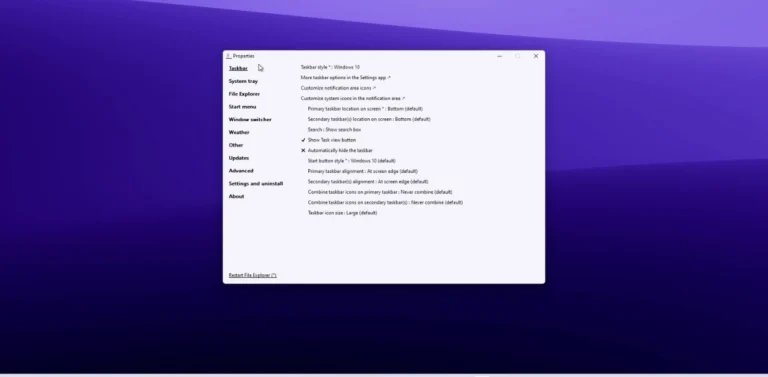
Classic Windows Taskbar Experience
One of the most popular ExplorerPatcher features is the ability to bring back a more traditional Windows taskbar.
Many users prefer the layout and functionality available in previous Windows versions. ExplorerPatcher allows you to customize the taskbar appearance, alignment, and behavior to better match your workflow.
Some available taskbar customization options include:
- Left or center taskbar alignment
- Classic taskbar layout
- Adjustable taskbar behavior
- Improved system tray customization
- Better control over taskbar notifications
These options make it easier to create a desktop environment that feels familiar and comfortable.
Flexible Start Menu Customization
The Start menu is one of the most frequently used parts of Windows. ExplorerPatcher provides additional customization options that allow users to adjust how the Start menu looks and functions.
Depending on your preferences, you can simplify navigation and organize your applications more efficiently.
Benefits of Start menu customization include:
- Easier access to installed programs
- Cleaner application layout
- Personalized navigation experience
- Faster access to frequently used tools
This flexibility helps create a desktop environment tailored to individual needs.
Improved File Explorer Integration
ExplorerPatcher also enhances the File Explorer experience by allowing users to adjust certain interface elements.
Many users prefer a simpler navigation style with quicker access to folders and files. ExplorerPatcher provides options that improve usability without changing the core functionality of Windows.
A more organized File Explorer can help reduce unnecessary clicks and improve daily productivity.
Better Control Over System Interface
Another valuable ExplorerPatcher feature is the ability to customize several interface components throughout Windows.
Instead of using the default layout, users can personalize different areas of the operating system to match their preferred workflow.
Customizable interface elements may include:
- Navigation behavior
- Context menu appearance
- Search interface options
- Notification area settings
- Desktop interface preferences
These adjustments create a more efficient and comfortable working environment.
Enhanced Productivity Through Personalization
Customization is not only about appearance. A well-organized desktop can also improve productivity.
ExplorerPatcher allows users to reduce distractions, simplify navigation, and arrange interface elements in ways that support daily tasks.
Whether you’re working, studying, or managing personal projects, a customized Windows environment can help you stay focused and organized.
Lightweight Performance
The application focuses primarily on interface customization without introducing unnecessary complexity. This makes it a practical option for users who want additional control over Windows while maintaining a responsive desktop experience.
Its straightforward approach allows users to enable the features they need without overwhelming the operating system.
One reason many users choose ExplorerPatcher is its lightweight design.
Easy Customization Options
ExplorerPatcher provides a wide range of settings that can be adjusted according to individual preferences.
Users can experiment with different configurations until they find the layout that works best for their workflow.
Popular customization options include:
- Taskbar appearance
- Start menu behavior
- System tray settings
- Desktop navigation
- Window interface preferences
- Search customization
- File Explorer options
This level of flexibility makes ExplorerPatcher suitable for both casual users and those who enjoy personalizing their desktop.
Why Users Choose ExplorerPatcher
Every Windows user has different preferences. Some enjoy the latest interface, while others prefer a more traditional desktop experience.
ExplorerPatcher offers a balance between modern Windows functionality and familiar interface customization. Instead of replacing Windows features, it gives users additional options to personalize how their desktop looks and behaves.
This flexibility allows users to create an environment that matches their habits and daily workflow.
Final Thoughts
ExplorerPatcher is a feature-rich Windows customization tool that gives users greater control over the Windows 11 interface. From taskbar adjustments and Start menu customization to File Explorer improvements and interface personalization, it offers numerous ways to create a desktop experience that feels comfortable and efficient.
If you’re looking for more flexibility in Windows 11 without making major changes to the operating system, ExplorerPatcher provides a practical set of customization features. By tailoring the interface to your preferences, you can create a workspace that is both familiar and productive.